P00.02 · Lesson 02 of 15
Git & Collaboration
A number you cannot trace to a commit is a rumour.
Build it Fork, branch, PR on this repo
- Learning outcomes
- Fork this repository, clone it, create a branch, commit a change with a one-sentence message, push it and open a pull request.
- Read
git statusandgit logoutput and state, from them, exactly what will and will not be in the next commit. - Implement and test a parser for
git logandgit status --porcelainoutput and a linter for commit subjects. - Resolve a merge conflict in a data file and decide what belongs in version control and what does not.
- Prerequisites
P00.01(a working terminal and Python environment). Skill check: you can create, edit and save a text file in your editor and find it again from the terminal.- Engineering question
Which exact version of the code and data produced this number, and can a colleague on another machine reproduce it a year from now?
Full lesson specification (11 more items)
- Assumptions and limits
Git records text well and binary files badly (no diffs, repository grows with every change). It records what changed, not why; the why lives in the commit message, which is only as good as its author. A commit proves a file's content at a time, not that the code was correct. Commit timestamps come from the author's clock, which can be wrong.
- Analytical work
The three-tree model (working tree, staging area, repository) as a state machine; why content-addressed hashes make history tamper-evident; why ordering commits needs timezone-aware instants rather than clock faces; reading a porcelain status table by hand.
- Computational deliverable
starter/main.py:parse_git_log,commits_per_author,is_newest_first,lint_subject,parse_status_porcelain,summarize. Tests prove the parser handles subjects containing the separator, rejects malformed lines, keeps order, compares instants across timezones, and classifies staged, unstaged, untracked and conflicted files, including a file that is both staged and unstaged.- Practical activity
data-based investigation: run the parser on this repository's real history and compare its author counts against
git shortlog; stage and resolve a deliberate merge conflict in a copy of a bill-of-materials file.- Equipment
A computer with Git installed (git-scm.com; on macOS
xcode-select --install; on Linux your package manager) and a free GitHub account. Tier: none.- Safety
None beyond normal computer use.
- Evidence
The URL of your pull request; the output of your
main.pyon the real log; a short note explaining any difference fromgit shortlog -sn; the resolved conflict file with its commit hash.- Assessment
assessments/phase-00/grading-rubric.md; competencies 2, 3 and 4. Pass: the pull request exists and its commits passlint_subject; all public tests pass; the shortlog discrepancy (if any) is explained correctly; the judgment question answered with a rule you could apply tomorrow.- References
Original instruction. The authoritative description of each command is the manual installed with Git:
git help(for examplegit help log) opens it.- Extensions
★ Make
main.pyreadgit logdirectly throughsubprocess.runwith a fixed format string, and compare%an(author) against%cn(committer) to find rebased commits.- Time
unmeasured
1. The engineering problem
A flight-test report states that the air density at 10 km used in the drag reduction was 0.4127 kg/m³. A month later a colleague re-runs the analysis and gets 0.4135. Both numbers came from "the atmosphere script". Which one went into the report, and why do they differ? If the script lives in a folder called final_v2_REAL, nobody will ever know. If it lives in a Git repository, the answer is one command away: the report cites commit 4a6d7e8, git diff 4a6d7e8 HEAD -- main.py shows that the gas constant was changed from 287.04 to 287.05287 in commit 5b7e8f9, and the discrepancy is explained to the last digit in two minutes.
Git is a version control system: a program that records snapshots of a folder, each labelled with a unique identifier, the author, the time, and a message, and that lets many people work on the same files and merge their changes. Engineering teams use it for code, for analysis scripts, for small data files, and increasingly for the report itself. For this course it does three jobs. It gives every result you produce a provenance: a commit hash that says exactly which code made it. It lets you work on a lesson without fear, because any change can be undone. And it is how you will contribute: the course is itself a Git repository, and fixing a typo in a lesson or adding a problem is done by the same fork–branch–pull-request workflow that professional teams use.
The engineering question is: which exact version of the code and data produced this number, and can a colleague reproduce it a year from now? Success criteria, set before we start: you have a fork of this repository on GitHub and a clone on your machine; you have made a change on a branch, committed it with a one-sentence message that passes the lesson's linter, pushed it, and opened a pull request; and your parser's author counts on the real history agree with Git's own shortlog, with every difference explained.
2. Understand and derive
2.1 Three trees and one state machine
Git tracks a file through three places:
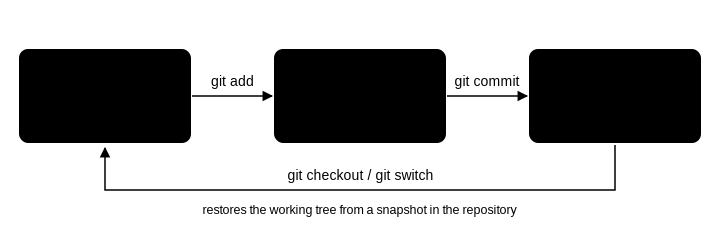
Editing a file changes the working tree only. git add copies its current content into the staging area, a list of exactly what the next commit will contain. git commit turns the staging area into a permanent snapshot in the repository. The staging area is what beginners find strange and what makes Git useful: you can edit five files, stage two, and commit a change that makes sense on its own, leaving the other three for a later commit. A commit should be one coherent change with one sentence describing it.
git status tells you where every changed file is in this diagram. Its machine-readable form, git status --porcelain, prints one line per file with a two-letter code: the first letter is the staging-area state, the second the working-tree state. M (M then space) means staged and unchanged since; M means modified but not staged; MM means staged, then modified again, so the working tree differs from what will be committed; A means a new file staged; ?? means Git has never heard of the file (untracked); UU means both sides changed the file in a merge and you must resolve it. Worked example. Given
M  starter/main.py
 M lesson.md
MM solution.py
?? scratch_plot.png
the next commit will contain the staged versions of starter/main.py and solution.py; lesson.md and the latest edit to solution.py will not be in it; scratch_plot.png will be in it only if you git add it, and you should not (§2.5). Your parser in part 3 encodes exactly this reading.
2.2 Commits, hashes, and why history is tamper-evident
Every commit is identified by a 40-character hexadecimal hash, such as 9f1c2d3e…, computed from the commit's complete content: the snapshot of every file, the author, the time, the message, and the hash of the parent commit. Change one character anywhere in history and every hash from that point onward changes. This is what makes a hash a trustworthy citation: "commit 9f1c2d3" names one exact state of the whole repository, and anyone with a clone can verify they have the same one. The first seven characters are enough in practice (Git refuses to resolve them if they become ambiguous).
A branch is a movable name pointing at a commit; main is the branch everyone agrees is the current good state. You never work on main directly. You create a branch (git switch -c lesson-03-isa), commit there, and ask for it to be merged. A remote is another copy of the repository, usually on GitHub: origin is your fork, upstream is the course's repository you forked from.
2.3 Ordering commits: instants, not clock faces
git log prints newest first. To check that in code you need the commit times, and here is a trap. Git stores each author date with its UTC offset, for example 2026-10-10T09:15:00-05:00. A commit made at 09:15 in Chicago (UTC−5) happened after one made at 13:40 in Berlin (UTC+2) on the same day, because 09:15−05:00 is 14:15 UTC and 13:40+02:00 is 11:40 UTC. Comparing the clock faces 09:15 and 13:40 gives the wrong order. The lesson's parser therefore reads dates as timezone-aware datetime objects (datetime.fromisoformat handles the offset) and compares those; Python then compares the underlying instants. Any date without an offset is rejected: a naive timestamp cannot be ordered against the others and silently accepting one would make is_newest_first lie.
2.4 A format string you can parse, and a message rule you can lint
git log is for humans. For a program, ask Git for a fixed format: git log --pretty=format:'%H|%an|%aI|%s' prints, per commit, the full hash, the author name, the author date in strict ISO 8601, and the subject line, separated by |. Why this order? Hash, author and date can never contain |; a subject can. Putting the subject last and splitting on at most three separators (split("|", maxsplit=3)) makes the parser correct for every possible subject. Put the subject anywhere else and a single commit message with a pipe in it breaks the whole log.
This repository's rule (CONTRIBUTING.md) is that a commit message describes the change in one plain sentence. The linter in this lesson makes that rule mechanical: a subject is flagged when it is empty, longer than 72 characters (the width at which Git's own tools start wrapping), ends with a period (convention: subjects are headlines), has leading or trailing whitespace, starts with a lowercase letter, or is a bare vague word such as wip, fix or update that tells the reader nothing. "Fix tropopause pressure tolerance in test_main.py" passes; wip does not. The point is not style for its own sake: six months from now git log --oneline is how you will find the commit that changed the gas constant, and a column of wip makes that impossible.
2.5 What belongs in version control
Text that humans write and that changes over time: code, lesson text, configuration, small data tables, the report. Not: generated files (plots, __pycache__, compiled output), because they can be regenerated and they create false conflicts; large binary data (video, HDF5 logs over a few megabytes), because Git stores every version in full and the repository becomes unusable; secrets (passwords, API keys), because history is forever and a leaked key cannot be un-committed. A .gitignore file lists patterns Git should never offer to add. For raw experimental data (P00.15), commit the small CSV and a README saying how it was taken; keep videos elsewhere and commit their hash so provenance survives.
3. Build the computational model
Two kinds of steps: terminal commands that put the repository on your machine and your change on GitHub, and Python that teaches your program to read what Git prints.
Step 1: Tell Git who you are
git config --global user.name "Your Name"
git config --global user.email "you@example.com"
git config --global init.defaultBranch main
The name and email go into every commit you make. Use the same email as your GitHub account so GitHub links commits to you.
Step 2: Fork and clone
On the course repository's GitHub page click Fork. This creates your own copy under your account. Then on your machine:
git clone https://github.com/<your-username>/aerospace-engineering-from-scratch.git
cd aerospace-engineering-from-scratch
git remote add upstream https://github.com/<course-org>/aerospace-engineering-from-scratch.git
git remote -v
origin is your fork (you can push there); upstream is the course (you fetch from there). Now create the virtual environment from P00.01 inside this folder; .venv/ is already in .gitignore.
Step 3: Branch, edit, inspect
git switch -c p00-02-first-prMake a small real change: fix a typo you have found in any lesson, or add your name to a CONTRIBUTORS file if one exists. Then look before you commit:
git status              # where is each changed file in the three-tree diagram?
git diff                # exactly what changed in the working tree, line by line
git add <file>
git diff --staged       # exactly what will go into the commit
Never commit without reading git diff --staged. It is the engineering equivalent of reading back a checklist item, and it catches the debugging print statement you forgot to remove.
Step 4: Commit with a sentence
git commit -m "Fix the lapse-rate sign in the P00.03 worked example"
git log --oneline -5
One change, one sentence, capitalised, no trailing period, under 72 characters. If you cannot describe the change in one sentence, it is two commits.
Step 5: Push and open a pull request
git push -u origin p00-02-first-prGitHub prints a link; open it, or go to your fork and click Compare & pull request. A pull request (PR) is a request that the course maintainers merge your branch into upstream/main. Write what you changed and why in two or three sentences, and link the issue if there is one. Reviewers may ask for changes: make them on the same branch, commit, push, and the PR updates itself. This is the entire collaboration workflow; every later contribution you make to this course or to any open-source project follows it.
Step 6: Stay current
While your PR waits, main moves on. To bring your branch up to date:
git fetch upstream
git merge upstream/main         # or: git rebase upstream/main
If the same lines were changed on both sides, Git stops and marks the file UU. Open it; the conflicting region is fenced by <<<<<<<, ======= and >>>>>>>. Edit it to the content you want (often a combination), delete the fence lines, git add the file, and git commit. §4 has you practise this deliberately before it happens by accident.
Step 7: Parse the log
Now starter/main.py. The dataclass Commit and the fixture strings are provided.
from datetime import datetime

def parse_git_log(text: str) -> list[Commit]:
    commits = []
    for lineno, raw in enumerate(text.splitlines(), start=1):
        line = raw.strip()
        if not line:
            continue                                   # blank lines are harmless
        parts = line.split("|", maxsplit=3)            # subject may contain '|'
        if len(parts) != 4:
            raise ValueError(f"line {lineno}: expected 4 fields, got {len(parts)}: {raw!r}")
        sha, author, date_text, subject = parts
        if len(sha) != 40 or any(c not in "0123456789abcdef" for c in sha):
            raise ValueError(f"line {lineno}: {sha!r} is not a 40-character hex hash")
        date = datetime.fromisoformat(date_text)       # raises ValueError on a bad date
        if date.tzinfo is None:
            raise ValueError(f"line {lineno}: date {date_text!r} has no timezone offset")
        commits.append(Commit(sha, author, date, subject))
    return commits
Each check turns a silent corruption into a loud error with the line number. A parser that returns six commits from a seven-line log with one bad line has lost data without telling anyone; one that raises tells you exactly which line to look at.
Step 8: Summaries and the linter
from collections import Counter

def commits_per_author(commits):
    return dict(Counter(c.author for c in commits).most_common())

def is_newest_first(commits):
    return all(a.date >= b.date for a, b in zip(commits, commits[1:]))
zip(commits, commits[1:]) pairs each commit with the next one; the list is in order if every adjacent pair is. Aware datetimes compare as instants, so the Chicago/Berlin case of §2.3 comes out right. lint_subject is a sequence of if tests appending a code to a list; the order of the codes does not matter, only their presence. Start with the empty case, which returns immediately, then test length, trailing period, whitespace, capitalisation and the vague-word set.
Step 9: Read the status table
def parse_status_porcelain(text):
    out = {"staged": [], "unstaged": [], "untracked": [], "conflicted": []}
    conflict_codes = {"DD", "AU", "UD", "UA", "DU", "AA", "UU"}
    for raw in text.splitlines():
        if len(raw) < 4:
            continue
        xy, path = raw[:2], raw[3:]
        if xy == "??":
            out["untracked"].append(path)
        elif xy in conflict_codes:
            out["conflicted"].append(path)
        else:
            if xy[0] not in " ?!":
                out["staged"].append(path)
            if xy[1] not in " ?!":
                out["unstaged"].append(path)
    return out
Note raw[:2] and raw[3:], not raw.split(): a path can contain spaces, and the porcelain format promises the code occupies exactly columns 1–2 with a space in column 3. A file marked MM lands in both staged and unstaged, which is the truth about it.
Verify
python -m pytest curriculum/phase-00/lesson-02-git-and-collaborationThe tests use the fixture log (six commits by two authors, one subject containing |, one wip, one trailing period) and the fixture status (seven lines covering every class). They check: the count of commits equals the count of non-blank lines; dates are aware with the right offset; the pipe-containing subject survives intact; blank lines and reordering do not change the result; four kinds of malformed line each raise ValueError; author counts sum to the commit count and are sorted; the newest-first check is true for the fixture, false for its reverse, and correct across timezones; each lint rule fires on its own example and the length boundary is exact at 72; and every status line lands in exactly the right lists, with MM in two.
Compare
Run your parser on the real repository and compare with Git's own summary:
git log --pretty=format:'%H|%an|%aI|%s' | python curriculum/phase-00/lesson-02-git-and-collaboration/starter/main.py -
git shortlog -sn
(On Windows Command Prompt, use double quotes around the format string.) The two author tables should agree exactly. If they do not, §5 lists the causes.
4. Experiment at home, or investigate real data
Mode: data-based investigation. The dataset is this repository's own history: public, under the repository's licence, recorded by Git at every commit. What was "measured" is who committed what, when, with what message.
Investigation 1: the history. Save the log (git log --pretty=format:'%H|%an|%aI|%s' > /tmp/log.txt), parse it, and record: the number of commits; the author table; the fraction of subjects that fail each lint rule; and whether the log is strictly newest-first. Prediction before running: a well-kept repository has under 5 % flagged subjects, and is_newest_first is not guaranteed to be true, because author dates survive rebases and merges can interleave branches made on different days. Write down which you expect for this repository and why.
Investigation 2: a conflict, on purpose. In a scratch copy (git clone this repository into /tmp/conflict-practice), create two branches from main. On branch a, change the quantity of one item in projects/_template/bom.yaml to 2; on branch b, change the same line to 3 and also change the item's description. Merge b into a. Record the exact git status --porcelain output (feed it to your parser: the file should be conflicted), open the file, and resolve it to quantity 3 with the new description. Commit, and record the hash. Then delete the scratch clone. You have now seen the worst thing Git does to a beginner, and it took four minutes.
Raw data format: the saved log.txt, your parser's printed summary, and the porcelain output from the conflict, kept with your lesson notes.
5. Validate and improve
Compare your parser's author table with git shortlog -sn and explain each difference. There are exactly four common causes:
| symptom | cause | explanation |
|---|---|---|
| an author appears twice with slightly different names | the same person configured user.name differently on two machines |
Git has a .mailmap file to merge identities; your parser counts names literally |
| your total is larger than shortlog's | shortlog by default counts the same commits, but a --no-merges flag on either side would exclude merge commits |
compare the commands used; count merges separately with `git log --merges --oneline |
| authors differ from the people who merged | author (%an) and committer (%cn) differ after rebases and squash-merges |
the parser reads authors; a maintainer who rebased your commit becomes its committer, not its author |
is_newest_first is False on the real log |
author dates survive rebases; merges interleave branches | this is correct behaviour, not a parser bug; %cI (committer date) is monotonic more often |
The validation standard is the same as for any measurement: every discrepancy has a named cause or you have not finished. "Git is weird" is not an explanation.
Improvements worth making: accept %cn and %cI as extra fields so the parser can report both author and committer; add a --no-merges switch; normalise author names through a small mapping. Improvement worth not making: parsing the default human-readable git log output. Its format changes with configuration and locale; the fixed format string exists precisely so programs never have to.
6. Defend your work
Submit: the URL of your open (or merged) pull request; the output of main.py - on the real history, with the shortlog comparison and the explanation of any difference; the porcelain output and resolved file hash from the conflict exercise; and three sentences on what you will and will not commit in this course and why.
Adversarial self-checks
- What if the log has 100 000 commits? The parser is linear in the number of lines and keeps all commits in memory; 100 000
Commitobjects is a few tens of megabytes, fine. A million-commit log would want a generator instead of a list. Where is the first line you would change? - What if a subject contains
|? Two of them? A newline? One or two pipes survive because ofmaxsplit=3. A newline cannot occur in%s, which is the subject line only; it would appear in%b(body), which we do not request. Check the fixture's pipe case passes. - Which assumption fails first in the real world? That
user.nameidentifies a person. It is free text; two people can share one, one person can have five. Identity in Git is a convention, not a guarantee, and signed commits exist for when it matters. - What measurement could falsify the ordering check? Set your system clock a day ahead, commit, set it back, commit again.
git logstill prints the second commit first (it follows parent links, not dates), butis_newest_firstreports False. That shows the function measures date consistency, not log order, which is what we want it to measure. - Does the result survive a change in format string? Swap the order to
%s|%H|%an|%aIand the fixture's pipe subject breaks the parser. The format is part of the interface;LOG_FORMATis a constant for that reason. - Which decision changes if the subject limit were 50 instead of 72? Two more fixture commits would be flagged; the rule would be stricter than the tooling requires and people would start abbreviating. Limits should come from a real constraint (terminal width, GitHub's truncation at 72), not from taste.
Check yourself
- In the three-tree model, which command moves content from the working tree to the staging area, and which moves it from the staging area to the repository?
- What does the porcelain code
M(space, M) mean, and will that file's change be in the next commit? - Why does the lesson's format string put
%slast? - Two commits:
2026-10-10T09:15:00-05:00and2026-10-10T13:40:00+02:00. Which happened later, and by how many minutes? - Give two reasons a plot image should not be committed.
- What is the difference between the author and the committer of a commit, and when do they differ?
- Why does
parse_git_lograise on a malformed line instead of skipping it?
Problem set
Attempt every problem before opening solutions/. Record the exact commands you ran and what Git printed.
1. (Warm-up) Read the status table
Given this git status --porcelain output, state for each file where it sits in the three-tree diagram and whether its change (or which of its changes) will be in the next commit if you run git commit right now:
A  curriculum/phase-00/lesson-03-numpy-engineering-calculator/tests/test_extra.py
 M curriculum/phase-00/lesson-03-numpy-engineering-calculator/lesson.md
MM solutions/phase-00/lesson-03-numpy-engineering-calculator/solution.py
?? scratch_plot.png
UU projects/p00-first-experiment/bom.yaml
Then write the minimal sequence of commands that commits only the lesson text change. Answer form: a five-row table and a command list.
2. (Argument) Why small commits
A teammate commits once a week with the message "weekly update". Write a short argument (under 200 words) for small, single-purpose commits with one-sentence messages. Use the drag-coefficient scenario from part 1 of the lesson: show concretely what git log and git diff can answer under each habit when a number changes unexpectedly. State the strongest case for the teammate's habit and when it would be acceptable.
3. (Unfamiliar scenario) A conflict in a bill of materials
You merge a colleague's branch and Git stops with this in bom.yaml:
- item: load cell, 5 kg, strain gauge type
<<<<<<< HEAD
  quantity: 2
  search_terms: "5kg load cell HX711"
=======
  quantity: 1
  search_terms: "5 kg load cell with HX711 amplifier board"
  note: one spare is not needed; the amplifier is the failure point
>>>>>>> feature/bom-review
Decide what the resolved block should contain and justify each line. Then state the commands that finish the merge, and what git status --porcelain shows for this file before and after you git add it. Finally: your colleague's commit timestamp is 2026-10-09T23:58:00-07:00 and yours is 2026-10-10T08:30:00+01:00. Which change was made first, in UTC?
4. (Numerical, uses your code) Your own history
Produce the fixed-format log of this repository (or any public repository with more than 50 commits that you have cloned) and feed it to your main.py with -. Report: number of commits, the author table, how many subjects each lint rule flags, and the value of is_newest_first. Compare the author table with git shortlog -sn and explain every difference using the table in part 5 of the lesson. If is_newest_first is False, find the first adjacent pair that is out of order and explain how it came to be (hint: git log --graph --oneline around those commits).
5. (Numerical, extends your code) Committer versus author
Extend a copy of your parser to read the format %H|%an|%aI|%cn|%cI|%s (author name and date, committer name and date, subject). On the same log, count the commits where author and committer differ, and the commits where the committer date is more than one day after the author date. Explain what each count tells you about how the repository's maintainers merge contributions. Answer form: two counts, a two-sentence interpretation, and the lines you changed.
6. (Judgment) What goes in the repository
For each of the following, decide whether it belongs in this course's Git repository, in a separate archive referenced by hash, or nowhere, and give the one-sentence reason: (a) the 40 kB CSV of raw timings from P00.15; (b) the 300 MB phone video the timings were read from; (c) the PNG plot of the results; (d) the Python script that made the plot; (e) a .env file containing a weather-API key used by a later lesson; (f) __pycache__/; (g) the virtual environment folder .venv/. Then write the .gitignore lines that enforce your answers for (c), (f) and (g).
Get the code
Clone the repository once, write your code in starter/main.py, then run the tests from the repository root.
pytest curriculum/phase-00/lesson-02-git-and-collaborationTo run the same tests against the reference solution instead:
AEFS_IMPL=solution pytest curriculum/phase-00/lesson-02-git-and-collaborationFound a mistake? Every page is built from the Markdown in the repository; edit it on GitHub.